
Modern Data Review for Trial Lawyers

Who to call to collect digital evidence, organize case files, host a review, and prepare for trial
Where do you find someone to collect a client’s text messages, make a large document production searchable, or help your team review years of business records? Start with a litigation technology provider that can connect the collection, organization, review, and presentation of digital evidence.
Modern litigation data review extends well beyond email. A single dispute may involve mobile messages, cloud documents, financial records, social media, video, and location data. Those records need to remain understandable and traceable as they move from their original sources into attorney review and, when appropriate, the courtroom.
JURIS LTS helps trial teams acquire digital evidence, organize and host case materials, support litigation review, and prepare evidence for presentation. Here is how to identify the help you need and what to have ready when you call.
Where do I find someone to help with litigation data
Describe the task first. “We need to review 40,000 files by next month” gives a provider a more useful starting point than asking for a software license. This chart connects common requests with the service to ask for.
| Collect texts or app messages from a phone | Mobile evidence collection or digital forensics | Device type, apps, relevant dates, device access, collection authority |
|---|---|---|
| Preserve a website or social media account | Online evidence preservation | URLs, account names, relevant posts, urgency |
| Organize a large email or document production | eDiscovery processing and litigation document management | Original files, load files, production specifications, deadline |
| Give several attorneys searchable access to case files | Hosted document review and project support | Approximate volume, users, permissions, review goals |
| Help reviewers find relevant records and track issues | Review workflow support and analytics | Issues, custodians, date ranges, review protocol |
| Produce documents in the required format | ESI production support | Agreed protocol, required fields, formats, deadline |
| Prepare exhibits and run evidence in court | Trial presentation and courtroom technology support | Trial date, venue, exhibits, depositions, equipment needs |
JURIS LTS supports these core needs through its eDiscovery, document hosting and review, document management, and trial services. Specialized sources should be scoped individually so the collection method and deliverables fit the matter.
What kinds of data can be involved in a modern review
Start by identifying where the relevant people communicated and worked. The chart below is a planning guide, not a promise that every source can be fully recovered. Access, device security, retention settings, licensing, and available exports affect what can be collected.
| Microsoft 365, Gmail, Exchange | Mailbox exports, server collection, forensic acquisition | |
| Documents | Word, PDF, Excel, PowerPoint | Targeted computer collection, imaging, cloud or network collection |
| Cloud storage | OneDrive, Google Drive, Dropbox, Box | API collection or supported exports; capture versions and metadata where available |
| Mobile devices | iPhone, Android | Logical or other forensic extraction, depending on device and access |
| Text messages | SMS, iMessage | Device or backup extraction; carrier records may provide limited information, not message content |
| Messaging apps | Teams, Slack, WhatsApp, Signal, Telegram | Enterprise exports, native exports, or supported device extraction; availability varies |
| Social media | Facebook, Instagram, LinkedIn, X, TikTok | Account exports, preservation services, forensic capture |
| Collaboration platforms | SharePoint, Teams, Confluence, Notion | Administrator exports or API collection; account for versions and linked files |
| CRM systems | Salesforce, HubSpot, Dynamics | Database exports, reports, API collection |
| Financial systems | QuickBooks, SAP, Oracle | Database exports and transaction reports with field definitions |
| Databases | SQL Server, MySQL, Oracle | Scoped database extraction, reports, schema documentation |
| Website content | Public sites, archived pages | Web preservation and forensic capture with URLs and collection details |
| Audio and video | Zoom, Teams recordings, security cameras | Native exports, related transcripts, media processing |
| Photographs | Digital images, EXIF metadata | Original file or device collection; preserve available metadata |
| IoT and GPS | Vehicle telemetry, wearables, access control | Device or service exports; identify retention and timestamp conventions |
| Call logs | Mobile, VoIP, PBX | Device, carrier, or enterprise records, subject to availability |
| CAD and engineering | AutoCAD, SolidWorks | Native files with relevant dependencies and versions |
| Source code | GitHub, GitLab, Azure DevOps | Repository preservation with relevant history and associated records |
For example, a spreadsheet may need its formulas, a chat may need surrounding messages, and a cloud document may need an earlier version. Converting everything to PDF at the outset can make those details harder to examine. Identify the question the evidence must answer before choosing the collection and review format.
Who can collect text messages and other digital evidence
Ask for a provider experienced with the specific device, application, or account involved. A useful collection plan identifies the custodians, sources, relevant dates, authorized access, and records needed to explain how the evidence was acquired. Counsel directs preservation obligations and scope; technical specialists support collection and documentation.
Depending on the matter, work may include forensic imaging, remote collection, cloud acquisition, mobile extraction, and technical assistance with legal holds. Chain of custody documentation records who handled the evidence and what happened to it. Preserve originals and document the steps used to create review copies.
JURIS LTS offers third-party collection from iOS and Android devices and describes collecting texts and app communications, including WhatsApp and Slack. Its forensic eDiscovery work also includes organizing mobile communications and location information to help attorneys examine events in sequence. What can be obtained depends on the source and collection conditions.
Related reading: Forensic eDiscovery without the Forensic Price
Who can turn a document dump into a usable review database
Ask for eDiscovery processing and litigation document management. Processing makes collected material more consistent and searchable while preserving the connections attorneys need to evaluate it. Before review begins, ask how the provider will identify files that failed to process, handle passwords, normalize dates, and keep emails connected to attachments.
| Metadata extraction | Search and sort by available author, sender, recipient, dates, and source details |
|---|---|
| DeNIST filtering | Filter known system and application files using reference lists; this is not a relevance decision |
| Deduplication | Reduce repeated review while retaining required custodian and source information |
| Email threading | Follow conversations and identify inclusive messages, with appropriate treatment of attachments |
| OCR | Search text in scanned documents; check important results against the images |
| Language identification | Route material for suitable language review |
| Container expansion | Extract material from ZIP archives, PST mailboxes, and other supported containers |
JURIS LTS’s product liability case study illustrates the value of preparation. The team received 15 archived mailboxes containing approximately 850,000 emails. Deduplication, indexing, and keyword searches narrowed the applicable set to about 53,000. Following additional preparation and a final review by 12 attorneys, 839 emails were identified for discovery. That is a case-specific result, not a projected reduction for every matter.
See the case: organizing 850,000 emails for a discovery deadline
Where can my team host and review litigation documents
Ask for hosted document review with project management. File storage gives you a place to put records. A configured review environment gives your team a way to search them, apply consistent issue tags, organize review sets, and prepare work for production or trial.
JURIS LTS uses iCONECT for hosted review and supports database setup, indexing, issue lists, search groups, chronologies, privilege logs, and production sets. Training and practical review assistance help the legal team use the database throughout the matter. Attorneys retain responsibility for legal judgments about relevance, privilege, and disclosure.
Before setup, agree on user permissions, naming conventions, review fields, and quality checks. Ask how new productions will be added, how exceptions will be reported, and how your files and work product can be exported when the engagement ends. For inactive cases, ask whether reduced-cost storage fits the access you still need.
Explore hosted document review and support
Can someone help us find the important evidence faster
Yes. Review support can combine focused searches with tools that organize related material. The right approach depends on the questions in the case, the available data, and the features enabled in the review environment.
| Issue tagging and chronology building | Connect documents to allegations, witnesses, and disputed events |
|---|---|
| Keyword refinement and concept searching | Test terminology and locate potentially related subject matter |
| Near duplicate identification | Compare versions and group similar records |
| Communication mapping and relationship analysis | Explore who communicated with whom and how records connect |
| Timeline analysis and custodian comparisons | Compare events and records across people, sources, and dates |
| TAR and predictive coding | Use attorney coding to help classify or prioritize documents in a validated workflow |
| Continuous Active Learning or CAL | Update review prioritization as reviewers code additional material |
| AI-assisted summaries | Create draft descriptions to check against the underlying records |
| Privilege review and redaction workflows | Track attorney decisions and prepare material for quality control before release |
Technology Assisted Review, or TAR, and generative AI summaries perform different jobs. A prioritization model helps decide what to review next; a generated summary attempts to describe content. Neither should be treated as a substitute for checking the evidence and applying attorney judgment.
JURIS LTS has published an iCONECT analytics case study involving related-document grouping, near duplicates, and review batching. Ask which analytics are appropriate for your matter and which tools are included in the proposed scope. CAL, generative summaries, and other advanced functions should be confirmed individually rather than assumed to be part of every hosted review.
For generative AI, establish how confidential data is handled, who can access it, and how outputs will be verified. ABA Formal Opinion 512 discusses lawyers’ responsibilities when using these tools, including competence, confidentiality, and supervision.
Related reading: linear review versus review with analytics
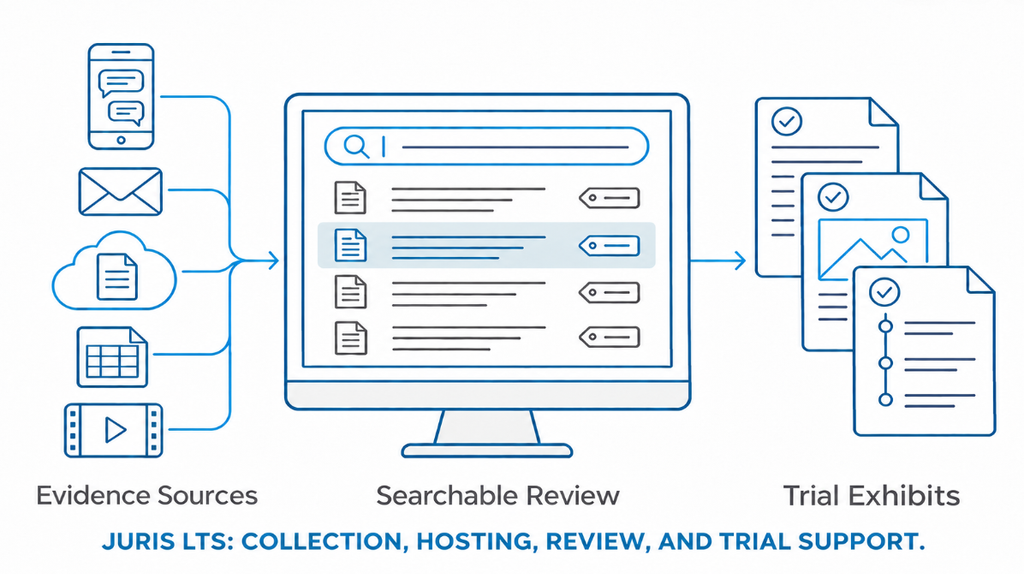
Who can prepare the production and help use the evidence at trial
Ask for production support that works from the actual ESI protocol. Requirements may include TIFF or PDF images, native files, metadata load files, Bates numbering, redactions, confidentiality designations, and privilege logs. A useful quality check confirms that the production matches counsel’s approved selections and that images, extracted text, metadata, and redactions align.
Then plan how the evidence will be used. A review database and a courtroom presentation system serve different purposes. The transition should preserve exhibit identifiers and make selected documents, testimony, and media easy to retrieve during preparation and examination.
JURIS LTS supports exhibit preparation, demonstratives, deposition video and transcript synchronization, video designations, and electronic exhibit management. Its courtroom services include OnCue support, live presentation, equipment setup, and technical assistance. Discuss hot seat responsibilities, last-minute exhibit changes, and war room needs as part of trial planning.
Keep the broader collection accessible when appropriate. An unexpected answer from a witness may send the team back to records beyond the preselected exhibits. Decide before trial who will search those records, who will verify the result, and who will present an approved exhibit.
Explore trial preparation and courtroom presentation services
Do I need software or someone to manage the work
Both may be useful, but buying access to software does not assign responsibility for collection, processing exceptions, review setup, or production checks. Ask who will do each task and who will answer when the team needs help.
Review and processing technologies include iCONECT, Relativity, Reveal, Everlaw, DISCO, CloudNine, Casepoint, Nextpoint, Logikcull, and Nuix. Collection and forensic technologies include Cellebrite, Magnet Forensics, Oxygen Forensics, and OpenText EnCase. Logikcull is part of Reveal. These products serve different purposes; a list of platform names does not establish a provider’s services or capabilities.
Service providers also differ. Some focus on digital forensics, hosting, eDiscovery consulting, managed review, evidence management, or trial presentation. Others offer court reporting, expert witness support, or cyber incident response. Define the work your case requires rather than assuming one engagement includes every specialty.
What to send when you contact JURIS LTS
Start with a short description of the matter, the task you need completed, and the next deadline. Include the known sources, approximate data volume, number of devices or custodians, and whether the material has already been collected. If you have production requirements or a review protocol, identify them. JURIS LTS can then discuss the scope and a suitable method for transferring case materials.
The goal is a usable body of evidence: records collected with context, organized for attorney review, and prepared for the moment you need them. Whether your immediate problem is a phone full of messages or a large production that nobody can search efficiently, JURIS LTS can help identify the next step.
Need someone to collect digital evidence, organize a production, or support litigation review? Schedule a consultation with JURIS LTS or call 888-991-8108.